Overview








Embracing the latest technology ecosystem, built for AI: 94AI's next-generation shared component library.
Documentation · Playground · Development Log · Changelog · Release · npm
Building on the business capabilities of common-ui, this project moves to Vue 3 / Element Plus and provides a unified foundation for component development, builds, documentation, live experimentation and releases.
Installation · Quick Start · FAQ · Writing Documentation · AI Agents
Background and Goals
As business applications upgrade their technology stacks, their shared component library must evolve to support new architectures, tooling and long-term maintenance. Built on the capabilities and domain experience of common-ui, common-ui-plus modernizes the engineering foundation to improve extensibility, stability and maintainability.
This is more than a dependency upgrade. It revisits builds, themes, types, internationalization, automatic imports and release workflows while preserving component behavior, documentation interactions and familiar development practices wherever possible. The architecture draws on Element Plus's component organization, configuration providers, theme tokens and type design, adapted to 94AI's business requirements.
Library generations
├─ common-ui (legacy)
│  ├─ Technology: Vue 2 / Element UI
│  ├─ Package scope: @94ai/*
│  └─ Continues to serve existing applications
├─ common-ui-plus (current)
│  ├─ Technology: Vue 3 / Element Plus
│  ├─ Package scope: @94ai-plus/*
│  └─ No Vue 2 runtime compatibility layer
└─ Maintenance: independent packages and version lines protect existing applications from upgrades
Technology Stack
The following baseline versions are pinned exactly in this repository rather than installed from a floating “latest” version. The baseline aims to adopt the latest technology ecosystem and frameworks as of November 15, 2026, as listed below:
| Technology | Version | Purpose |
|---|---|---|
| Node.js | 22.13.0 | Development, build and release runtime |
| Yarn | 4.13.0 | Corepack, Workspaces and the node-modules linker |
| Vue | 3.5.44 | Component runtime and SFC compilation |
| Element Plus | 2.14.7 | Foundation components and global configuration |
| Vite | 8.3.4 | Component, documentation and playground builds |
| TypeScript | 7.0.2 | Project language/toolchain baseline |
| VitePress | 2.0.0-alpha.20 | Documentation framework, custom theme and responsive mobile layouts |
| @vue/repl | 4.7.2 | Standalone playground and isolated previews |
| Lerna | 10.1.1 | Fixed-version package management and publishing |
| unplugin-vue-components | 30.0.0 | Automatic component and theme-style imports |
| @94ai/rt-cli | 1.1.5 | Retained engineering tooling and filesystem compatibility tests |
VitePress 1.6.4 from the initial proposal uses Vite 5. The implementation instead pins 2.0.0-alpha.20, which supports Vite 8. Vue type checking, declaration generation and ESLint currently use an isolated TypeScript 5.9.3 compatibility layer; the playground's type service is also independent of root TypeScript 7. See the FAQ for the rationale and conditions for removing these adapters.
Modernization Scope
├─ 1. Retaining the complete build pipeline for all package output formats
│  ├─ build.ts supports SFC, script setup, TS, JS, TSX, JSX, styles and static assets, producing ESM, CJS, browser ES / UMD, declarations and CSS.
│  ├─ SFCs compile to Vue 3 render functions.
│  └─ The build toolchain smoothly upgrades to Vite 8, replacing Rollup with the Rust-based Rolldown bundler. Rust combines native execution performance close to C/C++ with safe parallelism through “fearless concurrency”, improving multicore CPU utilization and build efficiency.
├─ 2. Enhanced multi-theme architecture
│  ├─ Independent Chalk / OEM packages provide aggregate CSS, per-component CSS, SCSS and assets, with Element Plus Sass-token and CSS-variable adapters.
│  └─ Primary colors are #1177ff for Chalk and #007555 for OEM.
├─ 3. Documentation architecture and indexed search engineering
│  ├─ A custom VitePress theme retains the original site's branding, navigation, layout and interactive examples, with a smooth transition to responsive layouts for reading documentation on mobile devices. extract.ts preserves the legacy doc-search.json contract and writes enhanced text/link data to a separate index.
│  ├─ Documentation uses a constrained OSS publisher that preserves historical versions;
│  ├─ public npm publication also uploads a lib ZIP and adds its GitLab Release download link.
│  └─ The new site has a separate prefix from Vue 2 documentation.
├─ 4. Automated publish, release and changelog engineering
│  ├─ publish.ts, the documentation publisher and separate Release scripts manage package publication, deployment and version notes, with version, package-content, permission and remote checks plus dry runs without external writes.
│  └─ Development logs are generated separately by utils/statistics/changelog.ts.
├─ 5. Improved code completion and type inference
│  └─ TypeScript declarations, Vue GlobalComponents and consumer fixtures validate template tags, props, events and slots for inference and completion.
├─ 6. Monorepo management
│  ├─ Yarn Workspaces manages source packages and internal tools;
│  └─ Lerna fixed mode manages publishable packages. put.ts preserves the original invocation style without temporarily rewriting root workspaces.
├─ 7. Live development
│  ├─ The standalone playground uses @vue/repl.
│  └─ Documentation retains CodeMirror inline editing, in-document live previews for every DemoBlock, copying, JS / TS conversion and playground links.
├─ 8. Automatic-import integration
│  ├─ common-ui-resolver connects to unplugin-vue-components, continuing the previous unplugin approach.
│  └─ Other composable tools are evaluated as needed rather than assumed compatible before integration.
├─ 9. Improved internationalization engineering
│  ├─ common-locale provides language packs, reactive contexts, registration, switching and an optional vue-i18n adapter.
│  └─ CommonUI and Element Plus locale configuration remain distinct.
├─ 10. Compatible command entry point implementations
│  └─ Original package.json script keys and familiar invocations are retained, with implementations mapped to the new toolchain and additional type-checking, testing and preflight commands.
├─ 11. AI-assisted maintenance
│  ├─ Initial migration of the agreed component scope is complete.
│  ├─ Work now focuses on fixes, enhancements and regression coverage for existing components, with no further legacy-component migration planned.
│  └─ Cross-model development follows AGENTS.md, using public APIs and business behavior as acceptance criteria.
└─ 12. Engineering knowledge
   └─ FAQ.md, package documentation and the migration inventory record compatibility issues, behavioral differences, root causes and solutions to support future maintenance and adoption.
For cross-model collaboration, see AGENTS.md (Chinese).
Current Status: Initial Component Migration Complete
For the current workspace version, see the fixed version in root package.json and lerna.json. Initial migration of all components within this phase's scope is complete, and the project is now maintaining and iterating on those components. The repository contains component and tooling source packages, documentation, a playground and publication preflight checks. Global configuration is provided by NfConfigProvider within the aggregate package.
| Category | Components |
|---|---|
| Basic interaction | NfButton, NfEmpty, NfImportTemplate, NfRadioGroup, NfAlert, NfTag |
| Feedback and overlays | NfDrawer, NfMessage, NfNotification, NfConfirm |
| Layout and display | NfResizablePanels, NfIndicatorPlane, NfTextOverflow, NfAction, NfInfiniteMenu, NfAudio |
| Dates and periods | NfDatePicker, NfHalfYearPicker, NfHalfYearRangePicker, NfWeekRangePicker |
| Forms and tables | NfFormItem, NfForm, NfSearchForm, NfTable |
| Rules and selection | NfRules, NfConditions, NfKeywords, NfVariableSelect, NfTransferSelect, NfVirtualSelect, NfLazySelect, NfPopupLazySelect |
| Web phone bar | NfSoftphone, the nfSoftphone singleton and the nfSoftphoneManager class |
NfConfigProvider (exported by @94ai-plus/common-ui)
├─ Scope: reactive default props for all components, with nested inheritance
├─ Precedence: explicit props → nearest Provider → outer Providers → original defaults
├─ Merge rules
│  ├─ undefined inherits; false, 0 and empty strings are preserved
│  └─ Merge by property; arrays, objects and functions replace whole values, without deep merging
├─ Timing: initialization options follow each component's existing lifecycle
├─ Services: call from the setup of a Provider descendant
│  ├─ useMessage() / useNotification() / useConfirm() inherit current configuration
│  └─ Context-free service calls and softphone manager instances do not read the component tree
├─ Date fallback: half-year, half-year-range and week-range read own defaults, then nfDatePicker
└─ Local settings: pass events, slots and required business data on the component
See global configuration for all options and editable examples for each component.
NfSearchForm / NfTable
├─ NfSearchForm: configured fields, linked loading, search/export/reset, validation, field settings
├─ NfTable: search, pagination, selection, trees, nested headers, operation bars, columns, virtual scrolling
├─ Cache: search field settings, table column settings and resized widths use IndexedDB
│  └─ Use a distinct storageKey for multiple instances on the same page
└─ Virtual scrolling: requires fixed row heights and stable row-key values
└─ Use normal mode for tree expansion, row spans and variable row heights@94ai-plus/nf-softphone
├─ Implementation boundaries
│ ├─ Combines legacy nf-microphone / nf-microphone-vue
│ ├─ Loads 94AI's shared online phone bar through qiankun / wujie micro-frontend calls
│ ├─ UI, permissions and business capabilities come from the remote app; not a local SIP implementation
│ └─ Does not preserve the old same-named nf-softphone iframe / postMessage protocol
├─ Three integration styles
│ ├─ Vue SFC: NfSoftphone; singleton: nfSoftphone
│ └─ Multiple instances: new nfSoftphoneManager(), isolated by distinct name values
├─ Defaults: omitted isOem / numberKeyBoard retain true; explicit false disables them
├─ Message type: SoftphoneMessageType preserves existing action and notification protocols
├─ Asynchronous signature initialization
│ ├─ Set :auto-start="false"
│ ├─ Update signature and timestamp in onMounted(async () => …) → await nextTick()
│ └─ Call the component ref's initSoftphone(); guard against initialization after unmount
├─ Loading and errors
│ ├─ loading / error slots; default “Loading...” follows CommonUI locale
│ ├─ Loading layer covers the container until visible content renders and passes paint frames
│ ├─ No fixed delay or agent sign-in dependency; keep the container present and visible
│ ├─ ready only means the micro-app mounted; initSoftphone() also waits for render detection
│ ├─ Mount failure or no render within 30 seconds after mounting shows an error; retries show loading
│ ├─ Manager: await phone.ready → waitForSoftphoneRender(container, timeout?)
│ │ └─ Await the returned ready promise; call cancel() on teardown
│ └─ Component unmount destroys the micro-app and cancels render detection
└─ Signing and debugging (named exports from standalone and aggregate packages)
├─ createSoftphoneSign(): prefers Web Crypto; remotely loads CryptoJS only if unsupported
│ ├─ Concurrent loads are shared; normal component initialization does not load CryptoJS
│ └─ Fourth argument { env: 'sg' } uses seat.teleai.com; default host is seat.94ai.com
├─ No automatic window.CryptoJS; explicitly call installSoftphoneCryptoJS(options?) for global debugging
│ └─ Returns the same global instance, with shared regional configuration and load deduplication
├─ SOFTPHONE_CRYPTO_JS_CDN_URL: pinned third-party URL used only via explicit cryptoJsUrl
│ └─ No automatic cross-region or additional failure fallback
└─ Keep production secrets and signing on the backendSee the softphone package README for complete component, factory and singleton examples.
Package READMEs and display assets
├─ Display order: centered logo → version/environment badges → npm information card
│  └─ Card replaces the tagline; package heading on its own line; Contributors and License at the end
├─ Component/theme builds: shared template synchronizes common sections and lib/<package>/README.md
│  └─ Preserve package installation/usage text; package display images in dist/readme/
├─ Image and license URLs: current package version on jsDelivr's npm CDN
│  ├─ Available after public npm publication; private publication does not make public CDN assets available
│  └─ No dependency on local relative paths or private GitLab access
├─ Contributors: latest generated snapshot; update with yarn build:contributors when needed
├─ npm / Yarn archives: include README, LICENSE and images; preflight rejects missing or stale assets
└─ Installation availability: depends on the target registry's actual published state
See the Changelog for version history and the FAQ for integration guidance.
The project and all publishable packages use the MIT License, with a separate LICENSE file included in each package. Package metadata includes the official website, GitLab repository and issue tracker. The linked HomePage heading in each package README opens the official website.
Repository Structure
common-ui-plus/
├─ packages/                       # Publishable source packages
│  ├─ common-ui/                   # Aggregate entry, plugin, global configuration and types
│  ├─ common-utils/                # Shared utilities
│  ├─ common-constants/            # Shared constants and theme types
│  ├─ common-locale/               # Locale contexts and language packs
│  ├─ cli/                         # Offline AI knowledge CLI, MCP and consumer Skill
│  ├─ common-ui-resolver/          # unplugin automatic-import resolver
│  ├─ nf-button/                   # Buttons, states, sizing and events
│  ├─ nf-import-template/          # Template download, file import and validation
│  ├─ nf-radio-group/              # Single/multiple button selection and tooltips
│  ├─ nf-alert/                    # Alerts, descriptions, closing and custom slots
│  ├─ nf-drawer/                   # Drawers, asynchronous confirmation and vertical tabs
│  ├─ nf-message/                  # Message service, stacking and automatic closing
│  ├─ nf-notification/             # Notifications, corner stacking and action buttons
│  ├─ nf-resizable-panels/         # Draggable resizable panels
│  ├─ nf-indicator-plane/          # Metric cards
│  ├─ nf-text-overflow/            # Overflowing text
│  ├─ nf-action/                   # Overflow-action dropdowns
│  ├─ nf-infinite-menu/            # Arbitrarily nested menus
│  ├─ nf-audio/                    # Audio player
│  ├─ nf-form-item/                # Form items for collapsible forms
│  ├─ nf-form/                     # Collapsible forms
│  ├─ nf-rules/                    # Rule editor
│  ├─ nf-conditions/               # Condition-group editor
│  ├─ nf-keywords/                 # Keyword management
│  ├─ nf-variable-select/          # Variable selector
│  ├─ nf-transfer-select/          # Transfer selector
│  ├─ nf-virtual-select/           # Virtualized selector
│  ├─ nf-lazy-select/              # Paginated selector
│  ├─ nf-popup-lazy-select/        # Popup paginated selector
│  ├─ nf-softphone/                # Web phone component, singleton and manager
│  ├─ nf-date-picker/              # Half-year, half-year range and week-range pickers
│  ├─ nf-search-form/              # Configured search forms and field settings
│  ├─ nf-table/                    # Search, tables, pagination and column settings
│  ├─ nf-confirm/                  # Confirmation dialogs, async callbacks and promises
│  ├─ nf-tag/                      # Status tags, dots and custom content
│  ├─ nf-empty/                    # Empty states, themed illustrations and locales
│  ├─ nf-theme-chalk/              # Default component theme
│  └─ nf-theme-oem/                # OEM component theme
├─ internal/
│  ├─ ai/                         # Knowledge generation, version resolution, queries, tokens and client setup
│  ├─ build/                      # Component builds, documentation assets and playground integration
│  ├─ docs/                       # Docs version catalogs, OSS uploads, locks and same-version replacement
│  ├─ scripts/                    # Publication checks, auth, ZIP/Release, docs builds, coverage and compatibility
│  ├─ fixtures/                   # SFC / setup / TSX / JSX build inputs
│  ├─ metadata/                   # Migration inventory and other metadata
│  └─ wecom-assistant/             # WeCom bots, model-gateway integration and offline MCP assistant
├─ docs/
│  ├─ .vitepress/                 # Site configuration, custom theme, DemoBlock and examples
│  ├─ guide/                      # Installation, quick start and authoring guides
│  ├─ components/                 # Component and global-configuration Markdown pages
│  ├─ ai/                         # For Agents, CLI, MCP, LLMs and design guidance
│  ├─ en/                         # English documentation
│  ├─ ja/ es/ id/ th/ tl/ pt/      # Japanese, Spanish, Indonesian, Thai, Tagalog and Portuguese
│  ├─ playground/                 # Playground entry within the documentation
│  ├─ changelog.md                # Versioned publication notes
│  ├─ development-log.md          # Git-derived log generated by build:dev-log
│  └─ public/                     # Static assets, search indexes, browser dependencies and generated AI data
├─ playground/                    # Standalone @vue/repl application
├─ tests/
│  ├─ unit/                       # Components, locales, themes and utilities
│  ├─ ai/                         # Knowledge, CLI, MCP, version caches, Skill and client-setup tests
│  ├─ build/                      # Artifact loading, types and packaging
│  ├─ browser/                    # Documentation, examples and playground regressions
│  ├─ types/                      # Vue template consumer type checks
│  ├─ scripts/                    # Engineering, publication, OSS, CI, documentation and workflow tests
│  └─ helpers/                    # Shared DOM lifecycle helpers and component stubs
├─ utils/statistics/              # Git development logs, contributor bubbles and statistics
├─ lib/                          # Generated archive mirrors, not source workspaces
├─ coverage/                     # Generated test results, coverage reports, SVGs and commit records
├─ releases/                     # Public-npm lib ZIPs named by version and digest
├─ test-results/                 # Playwright output and failure traces
├─ build.ts                      # Component build entry
├─ theme.ts                      # Theme build entry
├─ extract.ts                    # Documentation search-index generator
├─ publish.ts                    # Public npm/private registry full and reuse publication entry
├─ config.ts                     # Website, registries, GitLab/GitHub and default-branch settings
├─ create.ts                     # Package scaffolding
├─ put.ts                        # Workspace dependency management
├─ package.json / yarn.lock      # Root scripts, dependencies and Yarn lockfile
├─ lerna.json                    # Fixed version for all publishable packages
├─ vitest.config.ts              # checks/build projects and V8 coverage thresholds
├─ playwright.config.ts          # Chrome regression and docs development server settings
├─ .gitlab-ci.yml                # Manual coverage, npm and documentation tasks
├─ .github/workflows/            # GitHub Packages and separate GitHub Release workflow
├─ .yarn/                        # Pinned Yarn bootstrap, plugins and dependency patches
├─ .env.example                  # Environment-variable template without real credentials
├─ .agents/                      # Maintainer AI workflow, skills, index, templates and read-only tools
│  ├─ docs/                      # Workflow conventions and on-demand reading guides
│  │  ├─ ai-workflow.md          # Task routing, implementation, verification, delivery and maintenance
│  │  ├─ component-contract.md   # API, type, theme, language and lifecycle checklist
│  │  ├─ context-loading.md      # Load task context without reading every resource
│  │  ├─ specs-lifecycle.md      # Specification IDs, status, task evidence and archival rules
│  │  ├─ translation-guide.md    # Eight-language mapping, terminology, placeholders and imports
│  │  └─ verification.md         # Choose unit, type, build and browser checks by risk
│  ├─ index/
│  │  └─ module-index.md         # Locate source, contracts, tests and maintenance entry points by module
│  ├─ skills/                    # Repository maintenance skills; each directory starts with SKILL.md
│  │  ├─ library-workflow/       # Choose focused implementation or specification paths and resources
│  │  ├─ library-context/        # Load contracts and evidence by module; follow call chains as needed
│  │  ├─ library-bugfix/         # Reproduce failures, identify root causes, apply minimal fixes and regressions
│  │  ├─ library-spec-planning/  # Write requirements, designs, tasks and acceptance cases
│  │  ├─ library-spec-delivery/  # Implement or resume tasks and record verification evidence
│  │  ├─ library-component/      # Component behavior, public types, exports, both themes and languages
│  │  ├─ library-translation/    # Translation, proofreading and multilingual string imports
│  │  ├─ library-theme/          # Both themes, CSS/SCSS, appearance and Tokens
│  │  ├─ library-doc-playground/ # Documentation, search, inline previews and standalone playground
│  │  ├─ library-build/          # Workspaces, build outputs, declarations and package contents
│  │  ├─ library-release/        # npm, Releases, versioned OSS publication and CI
│  │  ├─ library-ai/             # Offline knowledge, LLMs, CLI/MCP and client integration
│  │  ├─ library-qa/             # Quality verification with actual results and environment gaps
│  │  ├─ library-browser-qa/     # Headless browser interactions, assertions and failure evidence
│  │  ├─ library-doc-sync/       # Affected package docs, translated pages and AI consumer knowledge
│  │  ├─ library-knowledge/      # Engineering lessons with sources, scope and activation conditions
│  │  └─ library-spec-archive/   # Verify completion evidence, archive specs and preserve historical links
│  ├─ templates/                 # Copy records as needed; README.md explains their use
│  │  ├─ requirements.template.md # Scope, public contracts and acceptance criteria
│  │  ├─ design.template.md      # Technical design, integration points and compatibility
│  │  ├─ tasks.template.md       # Resumable task slices, status and execution evidence
│  │  ├─ test-cases.template.md  # Normal, edge, failure and lifecycle cases
│  │  ├─ bugfix.template.md      # Optional bug symptoms, root cause and before/after regressions
│  │  ├─ qa-report.template.md   # Separate QA results, unexecuted checks and environment limits
│  │  ├─ knowledge-entry.template.md # Knowledge drafts with sources and activation conditions
│  │  └─ handoff.template.md     # Cross-model handoff and resumption after interruption
│  └─ scripts/                   # Read-only validation and context-reading tools
│     ├─ specs.ts               # specs:status / specs:check command entry
│     ├─ spec-lib.ts            # Specification discovery, metadata parsing and format validation
│     ├─ workflow-check.ts      # ai:workflow:check validates workflow and local links
│     ├─ context-read.ts        # ai:context reads task resources within the requested scope
│     └─ context-lib.ts         # Shared context paths, reading scope and output limits
├─ specs/                        # Specifications, active plan, lessons and archives
│  ├─ README.md                  # Specification entry, directory conventions and read-only checks
│  ├─ PLAN.md                    # Active requirements, dependencies and progress
│  ├─ LESSONS.md                 # Reusable lessons with sources, scope and activation conditions
│  ├─ knowledge-sources.json     # Actual external knowledge sources; an empty list means none integrated
│  ├─ active/                    # Current specifications, each with a unique spec-id
│  │  └─ <spec-id>/              # Directory convention; create for the specific requirement
│  │     ├─ requirements.md      # Goals, scope, contracts, acceptance and lifecycle metadata
│  │     ├─ design.md            # Implementation, call chains, compatibility and risks
│  │     ├─ tasks.md             # Task status, results and verification evidence for resumption
│  │     └─ test-cases.md        # Verifiable acceptance scenarios and regression cases
│  └─ archive/                   # Archived specifications and evidence; preserve IDs and path mappings
│     └─ INDEX.md               # Historical topics, archive paths, status and evidence index
├─ AGENTS.md                     # Cross-model AI development guide (Chinese)
├─ FAQ.md                        # Engineering, migration, compatibility and troubleshooting (Chinese)
└─ CHANGELOG.md                  # Migration summary and docs entry; version notes live under docs
Source workspaces include packages/*, internal/*, docs and playground; Lerna manages publishable packages only. Edit source packages rather than generated dist / lib copies.
lib/, coverage/, releases/*.zip, test-results/ and documentation build outputs are generated on demand, may not exist yet, and are not committed as source. The current and historical sites are built locally under docs/.vitepress/dist/. Maintainer resources live in .agents/ and specs/; the consumer Skill is distributed under packages/cli/skills/common-ui/.
AI Engineering
AI workflow for library development
Repository maintainers start with AGENTS.md and the development workflow (Chinese). Choose bug diagnosis, an existing specification, documentation authoring, a focused implementation or a new specification based on task intent and public contract impact. Resume existing specifications from their tasks and evidence; documentation authoring checks facts before organizing content and validating examples and links. Implement, verify, update affected documentation and preserve evidence as appropriate. Publication uses the existing preflight: all tests pass and lines, statements, functions and branches each reach 99% coverage. The overview below lists all 17 shared Skills by stage of use.
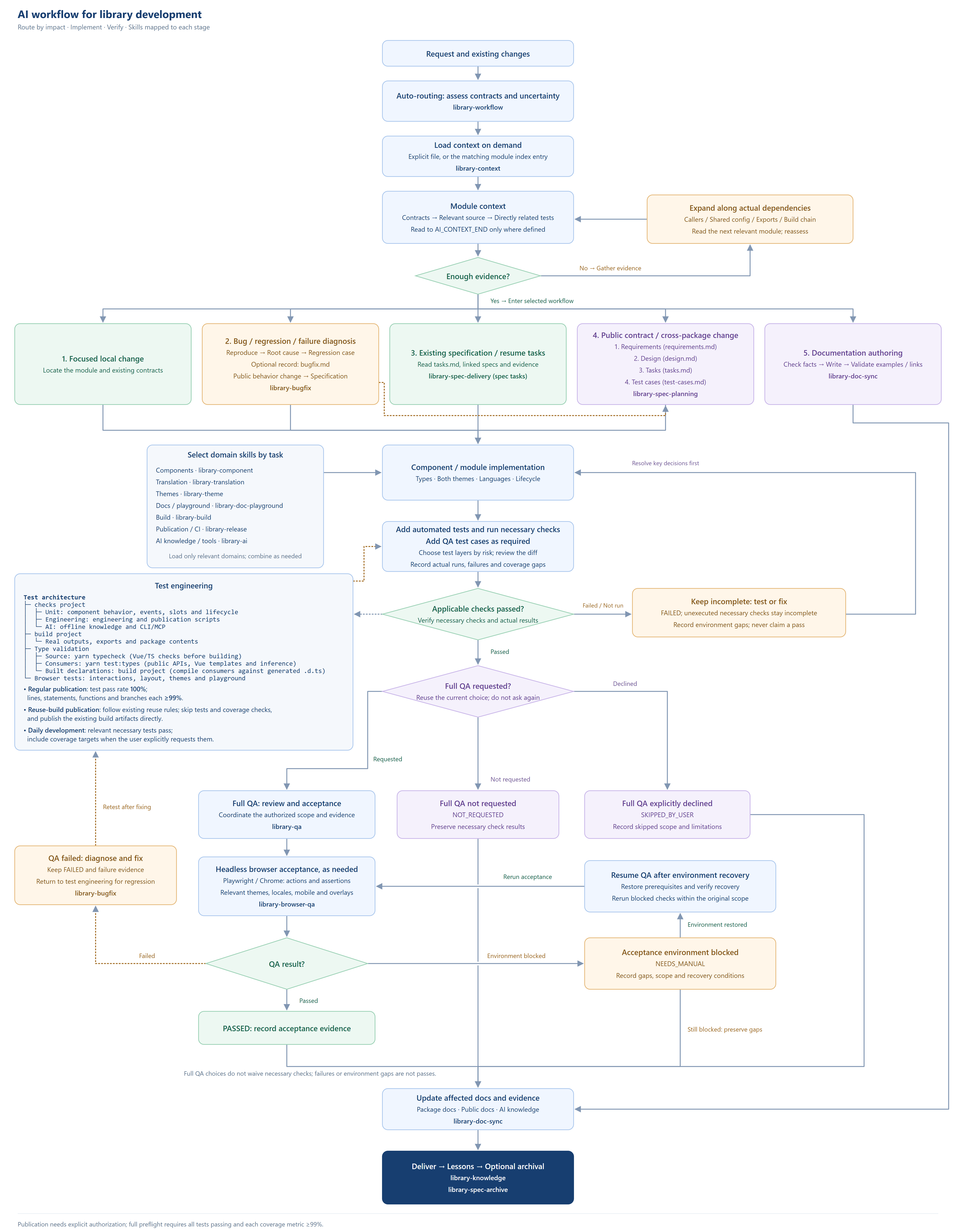
High-resolution PNG · Vector SVG · Generator
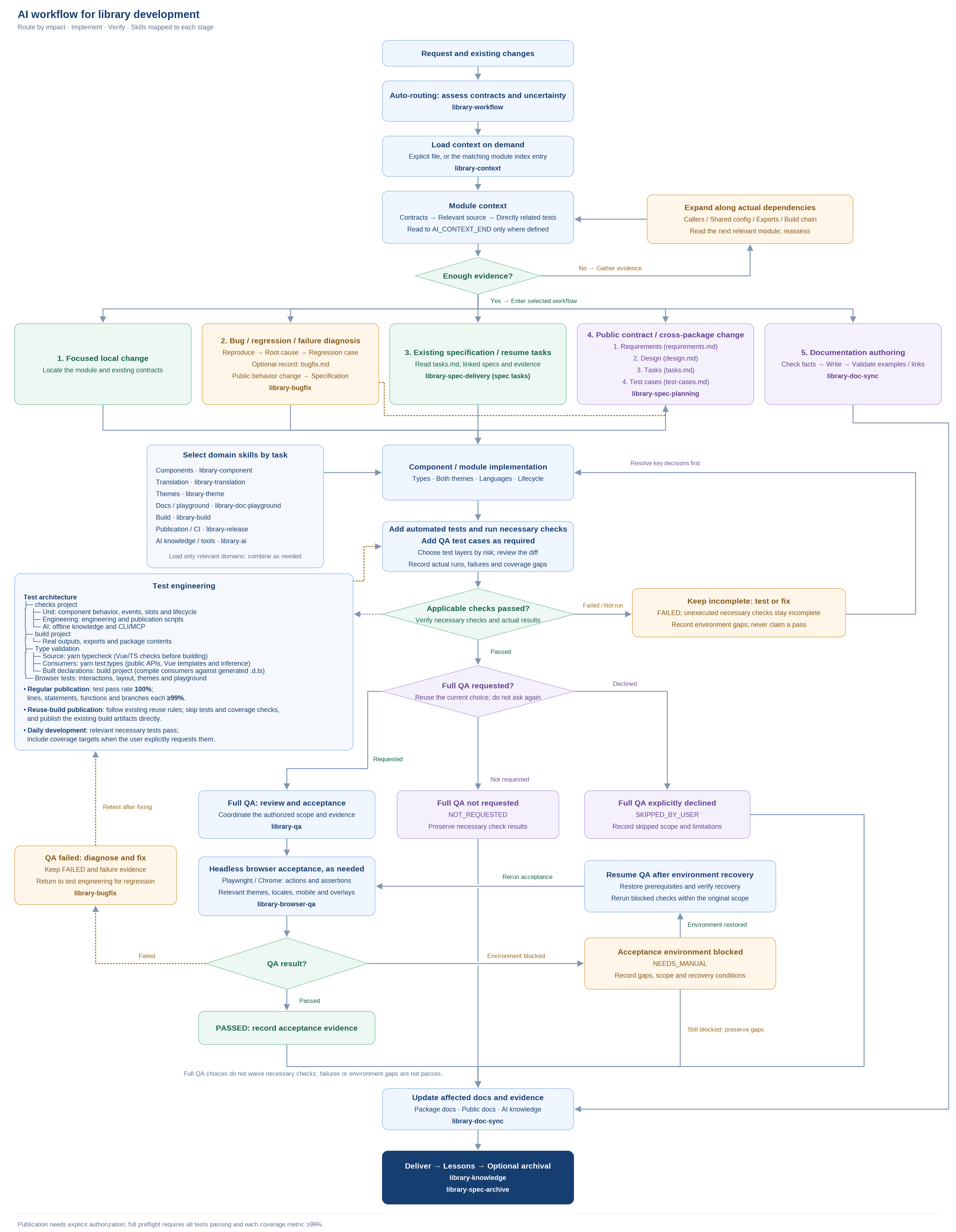
After selecting a workflow, use library-context to locate the relevant index entry and read module contracts, associated source and directly related tests. If evidence is insufficient, follow actual call chains and reassess before entering the selected workflow, without loading every module.
After implementation, add relevant tests, run necessary checks and review the diff. Failed or unexecuted necessary checks leave work incomplete. Select from unit, engineering/AI, type, build integration and browser tests. Regular publication reruns yarn test:coverage, requiring a 100% pass rate and each coverage metric ≥99%, with build integration checks for full publication. test:all does not enable coverage; explicit artifact reuse retains its existing exception.
Full QA follows the user's existing choice. When requested, library-qa coordinates acceptance and invokes library-browser-qa for relevant interactions using Playwright/headless Chrome with actions and assertions. Unrequested or explicitly declined full QA is recorded as NOT_REQUESTED or SKIPPED_BY_USER before documentation and delivery continue. Failures return to implementation, then to test engineering for regression checks; once applicable validation gates pass, repeat QA within the original authorized scope. Environment gaps are NEEDS_MANUAL: verify recovery conditions and rerun blocked acceptance checks after recovery, or retain the gaps and status while still blocked. These choices neither waive necessary verification nor indicate passing tests.
| Entry | Purpose |
|---|---|
| .agents/skills | Routing, bug fixes, planning, delivery, components, QA, documentation, knowledge and archival; read only the skills needed |
| Module index | Locate component, theme, build and AI source modules |
| Templates | Requirements, design, tasks, test cases, bug fixes, QA and handoff |
| specs | Active specifications, archives, PLAN and LESSONS |
Choose domain skills for the actual implementation. Both bug diagnosis and specification delivery can combine relevant domains:
| Domain | Skill | Responsibility |
|---|---|---|
| Components | library-component | APIs, types, Provider, exports and lifecycle |
| Translation | library-translation | Eight-language content, terminology, imports and placeholder preservation |
| Themes | library-theme | Chalk/OEM, CSS/SCSS, light/dark appearance and tokens |
| Docs and playground | library-doc-playground | Navigation/search, DemoBlock, REPL compilation and shared state |
| Build | library-build | Workspaces, outputs, exports, declarations and package contents |
| Publication and CI | library-release | npm/Release, versioned docs and same-version replacement, channel preflight |
| AI | library-ai | Exact-version knowledge, LLMs, CLI/MCP and consumer Skill/setup |
Ask AI to fix a component following the library workflow or continue the next task in a specified specification. These tools do not change task state, archive, commit, publish or generate changelogs. Skill auto-discovery depends on the client; Markdown entry points work without client configuration. Maintainer skills are separate from the consumer Skill distributed with the CLI below.
Errors, regressions and test, build or publication-script failures route first to library-bugfix: reproduce → identify the root cause → apply a minimal fix → verify regressions. Small fixes restoring existing contracts can proceed directly; changes to public behavior go through specification planning. Use the bugfix template as needed to record bugfix.md in an existing specification, without requiring four new specification files for every bug. Automatic routing means AI selecting a workflow from the task, rather than a background repair service.
├─ yarn specs:status: inspect task status
├─ yarn specs:check: validate specification structure
├─ yarn ai:workflow:check: check local links
└─ yarn ai:context: read context on demand
   ├─ yarn ai:context <file.md> --headings: list headings
   └─ yarn ai:context <file.md> --section "title": read a selected section
Using the Component Library with AI
AI Agents · Design · LLMs.txt · MCP Server · CLI
The AI module derives versioned APIs, source declarations, complete Vue examples and both theme guidelines from public documentation and source, in eight languages. Resources include the llms.txt index, full collections, component LLMs.md, component JSON and a manifest.json recording version/commit/digest. Offline knowledge and the manifest also carry the official homepage and snapshot documentation URLs, available through CLI/MCP. Confirm the installed library version first. Missing matching knowledge reports an explicit error; do not invent APIs or substitute another version.
| Entry | Purpose |
|---|---|
| For Agents / integration Prompt | Official resource URLs and a version-aware workflow for AI Agents |
| common-ui Skill | Component usage boundaries, command reference, development workflows and theme guidelines |
@94ai-plus/cli | Website URLs, offline knowledge, environment diagnostics, usage scans, snapshot comparison and theme Tokens |
| MCP | Ten read-only knowledge tools, including common_ui_site for website URLs, and two prompts sharing CLI version data |
| LLMs.txt / LLMs.md / JSON | Selectively read indexes, component APIs, declarations and complete examples |
Run queries or install the bundled Skill temporarily:
npx --package @94ai-plus/cli common-ui info NfTable --lang en-US
npx --package @94ai-plus/cli common-ui skills install
With the CLI installed, use npx common-ui. npx common-ui setup --client cursor --mode both configures project MCP and Skill files, with Claude Code, VS Code and Codex support. --dry-run and --check are read-only; existing services, comments and instructions are preserved, and conflicts are not overwritten. Skill installation also supports Claude Code, Cursor, Codex, Gemini CLI and other compatible Agents; it does not start or configure MCP.
Run yarn build:ai for development resources and yarn check:ai for read-only validation. Build the Node tool with yarn build:components cli, then use node packages/cli/dist/index.mjs. Development knowledge is labeled local; npm preflight builds the fixed-version snapshot after tests, without claiming registry publication. Browser components do not depend on CLI/MCP. See AI maintenance; repository work follows AGENTS.md.
AI module build engineering
AI module build engineering
├─ Collect existing public sources
│  ├─ Workspace manifests and navigation: package versions, component identity and public exports
│  ├─ Eight-language component docs and guides: API tables, complete Vue examples and prerequisites
│  ├─ TS/Vue source: exports, interfaces, types and macros with source paths and line numbers
│  └─ Themes and design: Element Plus light/dark Tokens, Chalk/OEM overrides and localized guidelines
├─ Generate a shared dataset: internal/ai/generate.ts
│  ├─ Combine components, packages, examples, guides, themes and existing changelog content
│  ├─ Record homepage, snapshot documentation URL, version/channel/commit/dirty/digest
│  └─ Validate versions, public exports, duplicate identifiers, example SFC structure and digest
├─ Generate site AI resources: yarn build:ai → docs/public/
│  ├─ ai/knowledge.json and ai/manifest.json: full knowledge, directory and provenance metadata
│  ├─ ai/components/<id>.json: structured component data
│  ├─ ai/docs/<locale>/<id>.md: component LLMs.md in eight languages
│  ├─ ai/examples/<locale>/<id>/<example>.json and ai/pages/: examples and public guides
│  └─ llms.txt, llms-full.txt, llms-full-cn.txt, design.md: index, English/Chinese collections and design
├─ Build offline tooling: yarn build:components cli
│  ├─ dist/index.mjs: standalone Node CLI with the MCP stdio server entry
│  ├─ dist/data/knowledge.json: bundled offline knowledge from the same generator
│  └─ Include the consumer Skill, README, LICENSE and images; synchronize the lib/cli archive mirror
├─ Generate version data for each use case
│  ├─ Ordinary AI/CLI builds: local data for current source development
│  ├─ Regular npm preflight: build the CLI fixed-version snapshot after tests; verify version and digest
│  └─ Documentation builds: AI resources with separate bases for current and versions/<fixed-version>/ sites
└─ Read-only validation: yarn check:ai recollects and validates source data without writing files
Site resource generation and CLI builds are separate entry points sharing the knowledge generator; build:ai does not build the CLI executable. Builds do not use a model to translate documentation, publish npm packages, upload documentation or edit changelogs.
Integrating Offline Knowledge with the WeCom Assistant
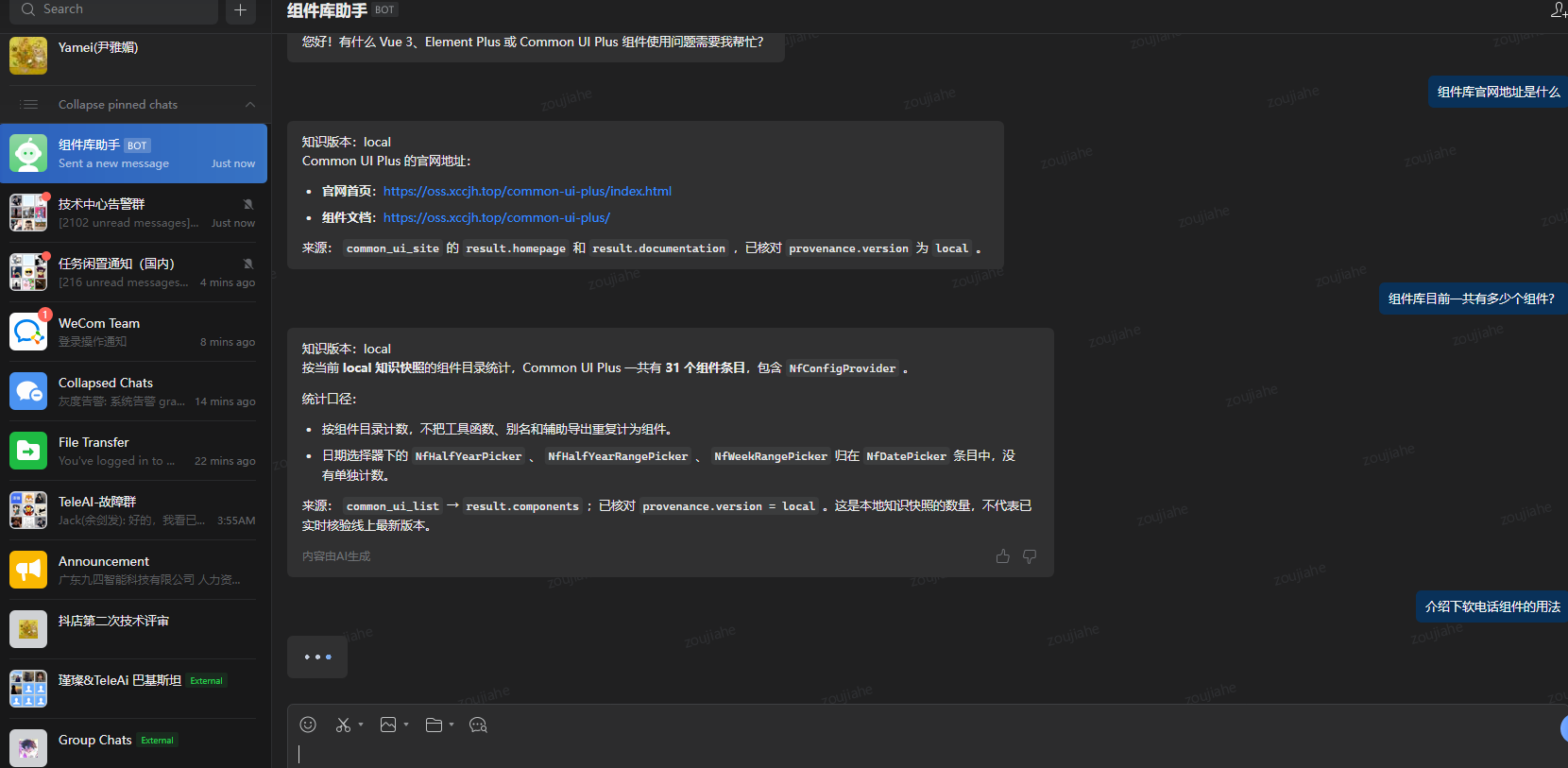
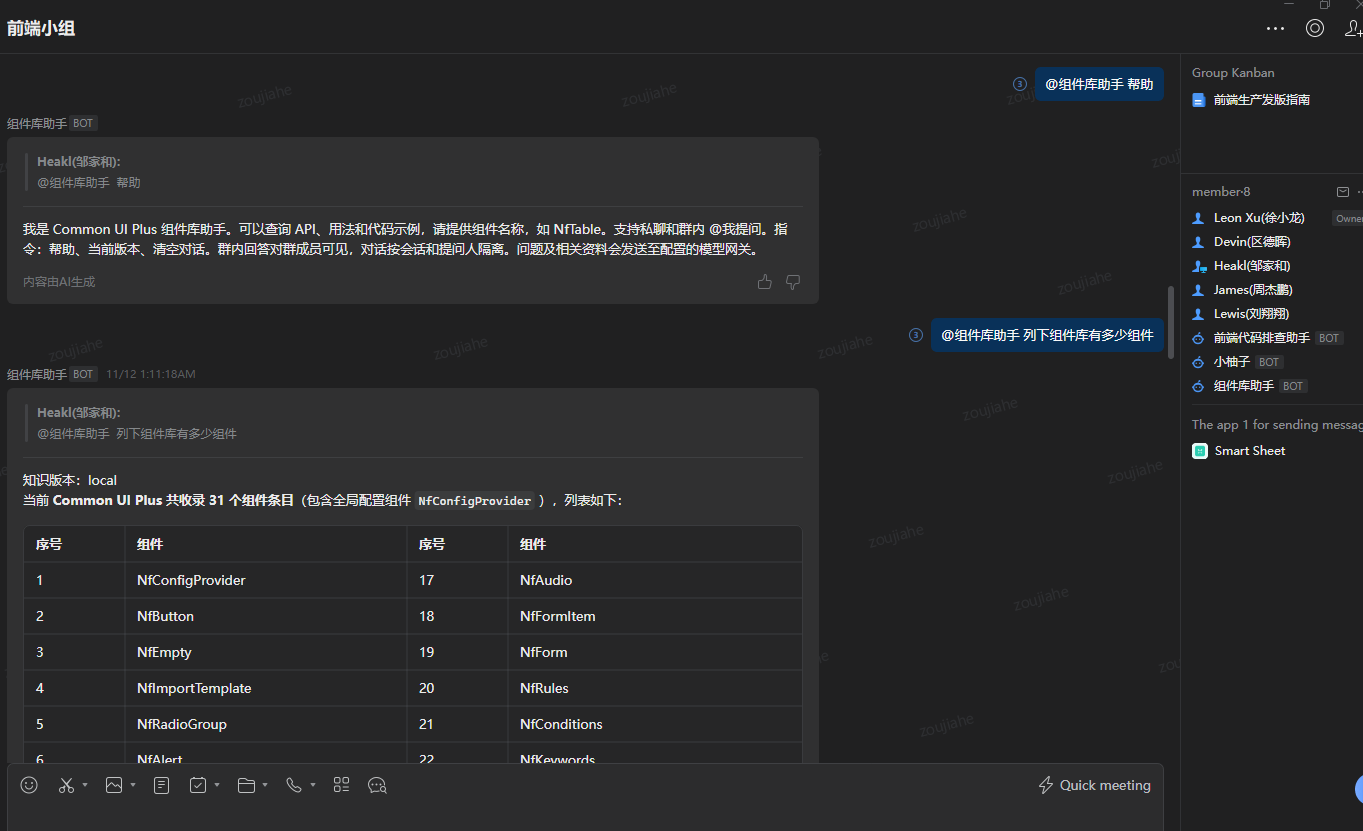
Use the component assistant in WeCom private and group chats to query component APIs, props, events, slots, complete examples, theme guidelines and official website URLs. GPT combines your question with the library's offline knowledge to help diagnose usage issues. Include the component name, installed library version, relevant code and errors to support version-matched investigation.
| Scenario | How to use it | Example |
|---|---|---|
| Private chat | Ask directly in the bot conversation; follow-up questions are supported | How do I set teleported on NfDrawer? or What is the official library website? |
| Group chat | Add the bot to an allowed group and use a genuine @mention | @组件库助手 How do I configure NfTable pagination? |
| Local commands | Send directly in private chats; @mention the bot in groups. These do not call GPT | 帮助 (help), 当前版本 (current version), 清空对话 (clear conversation) |
Private question / group @mention
└─ Local Node service receives the message over the WeCom persistent connection
   ├─ GPT via New API gateway: interpret the question and compose an informed answer
   ├─ Offline CLI/MCP: query APIs, examples, themes and website metadata for the configured version
   └─ Reply to the originating private or group conversation
Group context is isolated by group and questioner, separate from private chats, other groups and other members. Group replies are visible to group members. Administrators configure the knowledge version: source development defaults to local; fixed versions require a genuine matching offline snapshot in advance. Chat messages cannot switch versions, and missing resources produce explicit errors. Website URLs come from snapshot metadata. Knowledge queries are always offline, while GPT calls require networking and send questions, conversation context and relevant component documentation through the gateway to its upstream model.
Maintainers follow the WeCom assistant setup and troubleshooting guide (Chinese) to configure the bot and model gateway, then run from the repository root:
yarn build:components cli
yarn assistant:wecom
The default intelligent-bot API mode uses an outbound persistent connection and needs no inbound callback URL. Keep the computer or deployment host running with access to WeCom and the model gateway. This independent internal service is not shipped with component packages. The following screenshots illustrate private and group usage; versions and results reflect their snapshots at the time.
Private chat: website and component queries
Group chat: @mention the assistant for queries and troubleshooting
Application Integration
Configure the appropriate registry, then install dependencies. See Installation for authentication options.
yarn add vue element-plus @94ai-plus/common-ui @94ai-plus/nf-theme-chalkimport { createApp } from 'vue'
import ElementPlus from 'element-plus'
import CommonUI from '@94ai-plus/common-ui'
import App from './App.vue'
import 'element-plus/dist/index.css'
import '@94ai-plus/nf-theme-chalk/index.css'
createApp(App)
.use(ElementPlus)
.use(CommonUI, { theme: 'chalk' })
.mount('#app')You can also import individual component packages, or use @94ai-plus/common-ui-resolver with unplugin-vue-components to import components and their theme styles automatically. See package READMEs and component documentation for installation and APIs.
Global configuration
<script setup lang="ts">
import { ref } from 'vue'
import { NfConfigProvider, NfButton, NfHalfYearPicker } from '@94ai-plus/common-ui'

const halfYear = ref<Date | null>(null)
</script>

<template>
  <NfConfigProvider
    locale="zh-CN"
    theme="chalk"
    :nf-button="{ size: 'medium', type: 'primary' }"
    :nf-date-picker="{ clearable: true, disabled: false }"
  >
    <NfButton>Inherited defaults</NfButton>
    <NfButton :disabled="false" type="success">Local override</NfButton>
    <NfHalfYearPicker v-model="halfYear" />
  </NfConfigProvider>
</template>
With Chalk or OEM styles loaded, default single-line Element Plus controls are 28px high; small remains 24px and large remains 40px. Multiline content can grow. NfButton retains its mini / small / medium sizes, configured through nfButton.size.
Local Component Library Development
git clone http://gitlab.94ai.pro/ui/common-ui-plus.git
cd common-ui-plus
corepack enable
yarn install --immutable
yarn build:theme
yarn build:components
yarn dev:doc
The repository includes .yarn/releases/yarn-4.13.0.cjs, providing a shared bootstrap for global Yarn 1 and Corepack. If the bootstrap is unavailable, run node .yarn/releases/yarn-4.13.0.cjs install --immutable. Private-registry and npm authentication are covered in Installation.
The primary site uses /common-ui-plus/; the OEM site uses /common-ui-plus-oem/. Common development commands:
yarn dev:doc:oem                     # Develop OEM documentation
yarn build:theme nf-theme-chalk      # Build only Chalk (also accepts chalk)
yarn build:theme nf-theme-oem        # Build only OEM (also accepts oem)
yarn build:components nf-button      # Build a single package
yarn build:components nf-search-form # Build search forms
yarn build:components nf-table       # Build tables
yarn build:components nf-softphone   # Build the softphone
yarn extract:doc                     # Update documentation search indexes
yarn build:doc                       # Build documentation and playground
yarn build:doc:oem                   # Build OEM documentation and playground
yarn dev:playground                  # Develop the standalone playground
Documentation and Playground
After running yarn dev:doc, open /common-ui-plus/playground/ to edit SFCs and preview changes in real time. A separate playground server is not required.
├─ Documentation editing
│  ├─ DemoBlock: inline editing, JS / TS switching, copying and expand/collapse controls
│  ├─ Live editing of complete SFCs and SCSS
│  └─ In-document previews use <Suspense> for async setup and top-level await
├─ Playground versions and examples
│  ├─ Common UI, Vue, Element Plus and TypeScript version selection
│  ├─ Common UI defaults to local source (local); npm supplies public versions including prereleases
│  ├─ Local source and same-version npm artifacts are distinct choices, with matching runtime/theme/types
│  ├─ SCSS / Sass compilation, error panels and share-link restoration
│  ├─ Default SCSS example plus migrated components such as softphone, search forms and tables
│  └─ Opening a documentation example preserves its source without selecting a built-in example
├─ Internationalization, themes and appearance
│  ├─ Components, documentation and playground: Chinese, English, Japanese ja, Spanish es
│  │  └─ Also Indonesian id, Thai th, Tagalog tl and Portuguese pt
│  ├─ Language, Chalk / OEM and light/dark appearance are independent and persisted; default is light
│  └─ Custom business text is not automatically translated
├─ Softphone documentation examples
│  ├─ Async setup, asynchronous onMounted initialization, custom runtime, factories and singletons
│  ├─ Loading and error displays; examples explicitly pass the remote phone bar's lang
│  ├─ Documentation language changes destroy/remount examples to initialize the remote app again
│  │  └─ No guarantee of seamless language switching during calls
│  ├─ Application integrations default to zh; top-level locale does not map to remote language
│  │  └─ Configure nfSoftphone.lang; explicit component lang takes precedence
│  └─ Language does not switch domestic/overseas environments
├─ Preview and overlay scope
│  ├─ All DemoBlocks use in-document previews
│  ├─ Dropdowns, tooltips, column settings and service overlays use the full document viewport
│  ├─ Configuration examples manage their theme and locale independently
│  └─ The standalone playground remains isolated
└─ Compilation resources and networking
   ├─ Default Vue / Element Plus versions and compilation resources ship with the site
   └─ Other Vue / Element Plus or TypeScript versions may use a CDN and require network access
      └─ Listing a version does not guarantee compatibility with every option
Start with Global Configuration and Button. For composed capabilities, see Search Form, Table and Web Softphone. Browse component navigation for further examples, and see Writing Documentation for authoring guidance.
Versioned documentation and overwriting a specified documentation version
yarn build:doc / yarn build:doc:oem build both the current site and an independent versions/<fixed-version>/ site, including eight languages, search, playground and AI knowledge. The version comes from lerna.json. The development menu shows local; deployed sites display their build version, and historical URLs select that archive.
The next build clears and rebuilds docs/.vitepress/dist/; local output does not accumulate archives. Publication uploads only this version's archive and the current site, then merges the online versions.json. Existing OSS archives remain without re-uploading or overwriting. Archives start with actual releases; older versions require their corresponding sources.
yarn build:doc
yarn preview:doc
yarn publish:doc --dry-run
Real publication requires clean committed sources matching the fixed-version build. After reviewing the preview, run yarn publish:doc separately. The publisher validates files, acquires a theme-prefix lock, uploads the archive first, then updates the root site and catalog. Different content for an existing version is rejected. Chalk and OEM share local output, so build and publish them in sequence; GitLab provides separate publish-docs-chalk and publish-docs-oem tasks.
To replace documentation for the same version, build first, preview with yarn republish:doc --version 1.0.0-beta.0 --dry-run, then replace --dry-run with --yes to execute. The script directly overwrites the specified version without backups or automatic rollback; retry with the same build after a failure. It updates the root site only for the online latest version and preserves other versions. Use republish:doc:oem for OEM; CDN caches require separate refresh. See same-version documentation publishing.
Test Engineering
The test system combines two Vitest projects, type-consumer checks and Playwright browser regression tests. These validate source behavior, built packages, application-facing types and real page interactions. V8 measures source coverage for the publication gate; source coverage alone does not cover every browser or visual scenario.
Test Architecture
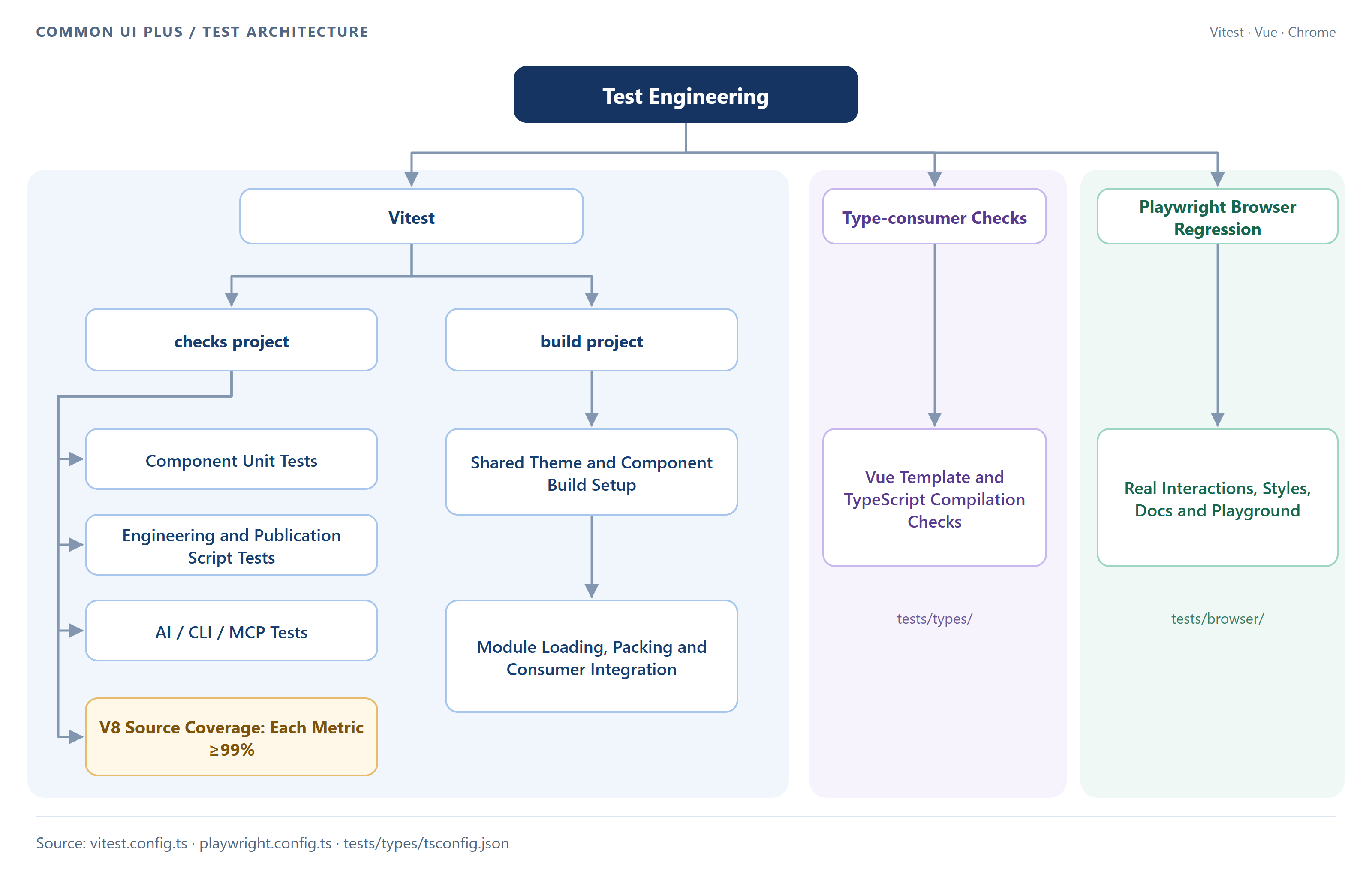
High-resolution PNG · Vector SVG · Mermaid source · Generator
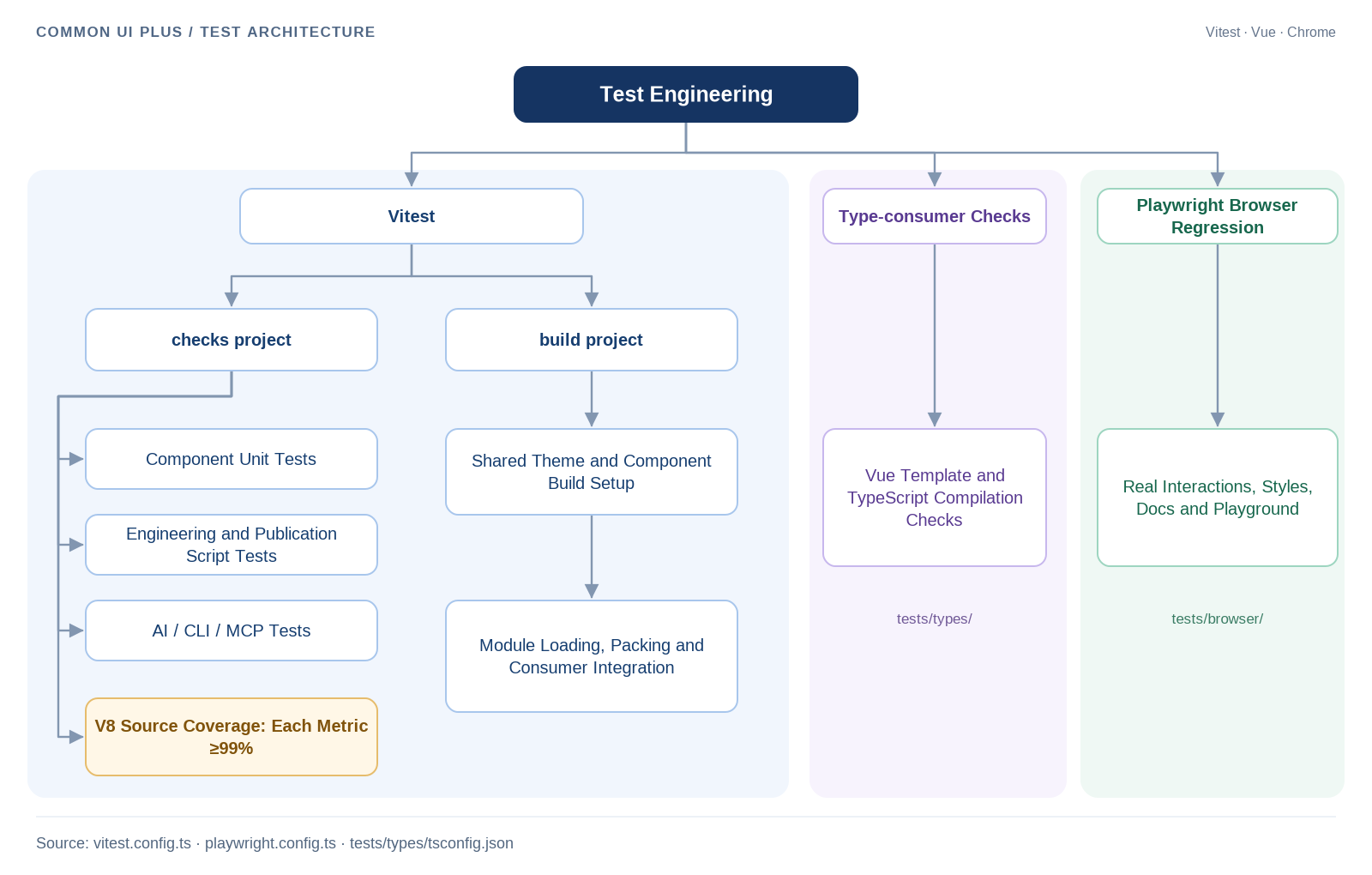
Configuration: Vitest, Playwright, type consumers and the coverage runner.
Responsibilities by Layer
| Layer | Directory | Main responsibilities |
|---|---|---|
| Component unit tests | tests/unit/ | Props, events, slots, global configuration, SSR, mounting and unmounting, asynchronous races, caching, languages and themes; interactive tests use happy-dom and @vue/test-utils. |
| Engineering and publication script tests | tests/scripts/ | Workspaces, builds, version synchronization, authentication, packing, OSS, Releases, CI, search, READMEs and failure recovery; external publication uses simulated requests and temporary directories. |
| AI tooling tests | tests/ai/ | CLI, MCP, knowledge snapshots, exact-version matching, online/offline caches, application project detection, Skill installation and client setup. |
| Build integration tests | tests/build/ | Actual ESM/CJS/UMD loading, exports, external dependencies, both themes, built declarations, npm package contents, README/LICENSE, archive mirrors and CLI artifacts. |
| Type-consumer checks | tests/types/ | Compile simulated Vue/TypeScript application usage to check templates, props, events and public types; the build project separately validates built declarations. |
| Browser regression tests | tests/browser/ | Real Chrome keyboard/mouse interactions, 28px sizing, overlays, Chalk/OEM, light/dark appearance, languages, inline documentation previews and the standalone playground. |
Vitest defaults to Node and uses workspace aliases to test source code. The checks project includes unit, engineering script and AI tests. Before workers read built artifacts, tests/build/setup.ts builds themes and components once for the build project, preventing concurrent tests from cleaning the same dist/lib directories.
Commands and Test Scope
| Command | Scope |
|---|---|
yarn lint:check | Check code quality without automatically fixing files. |
yarn typecheck | Vue/TypeScript checks for repository source. |
yarn test | Both Vitest projects: checks + build. Prepares build-test artifacts; no coverage by default and no Playwright. |
yarn test --project checks | Component unit, engineering/publication script and AI tests, without build integration tests. |
yarn test:build | Built-package integration tests with required build setup; alternatively use yarn test --project build. |
yarn test:scripts | Engineering and publication script tests only. |
yarn test:ai | AI/CLI/MCP tests only. |
yarn test:types | Compile-time type-consumer checks, without browser interactions. |
yarn test:coverage | Complete checks project plus V8 package-source coverage; each of four metrics must reach ≥99%. No build project or Playwright. |
yarn test:playground | All Playwright browser regression tests. Starts the docs development server on port 5180 by default and requires local Chrome. |
yarn test:all | Run lint:check → typecheck → test (checks + build) → test:types → test:playground; stop on any failure. Does not enable coverage. |
Full public/private/publish:github publication uses dedicated preflight rather than test:all: dependency audit → lint:check → typecheck → test:coverage → theme/component builds → build integration tests → fixed-version CLI snapshot → pack validation. It does not run the separate test:types command or Playwright regression tests. See Publishing Engineering for subsequent upload and Release behavior.
Verification and Regression Testing
yarn lint:check
yarn typecheck
yarn test:types
yarn test
yarn test:coverage
yarn test:playground
yarn audit:dependencies
yarn test:playground uses locally installed Chrome to test real documentation and preview interactions. Set PLAYGROUND_TEST_URL to a running site's complete base URL to test a production preview or OEM site. yarn test:all runs lint:check, typecheck, all Vitest tests, test:types and test:playground in sequence, stopping on any failure. It does not run additional theme/component builds, search extraction, production docs builds, publication previews, development log generation or coverage. The Vitest build project still prepares the required theme/component artifacts, and browser tests start the docs development server by default.
Code Test Coverage
The coverage target is 100%, with a repository-wide minimum of 99% for each of lines, statements, functions and branches. yarn test:coverage runs the complete Vitest checks project and fails if any metric falls below its threshold. It measures executable TS/JS/Vue source under packages/*/src/, including unexecuted files and excluding .d.ts. Styles, build artifacts, the build project and Playwright browser execution are outside this scope.
Local full-run snapshot from 2026-11-15 (UTC): all 1923 tests passed, for a 100% test pass rate.
| Metric | Coverage | Minimum |
|---|---|---|
| Lines | 99.67% | 99% |
| Statements | 99.29% | 99% |
| Functions | 99.01% | 99% |
| Branches | 99.04% | 99% |
Normal package publication must pass a fresh coverage run: public npm, private registries, GitHub Packages, local runs, CI and ordinary dry-runs enforce the same gate. Failed tests or any metric below its threshold stop publication; older reports cannot be reused. Full publication also runs the build project. Explicit public:reuse/--reuse-build trusts previously verified current-version artifacts matching the source, skipping dependency auditing, lint checks, type checking, all tests and coverage, and builds; it generates no new verification report. See the 1.0.0 release notes.
Interactive unit tests mount components with happy-dom and @vue/test-utils, covering inputs, selection, validation, rule and condition editing, pagination, virtual lists, layout measurement, audio, feedback services, and softphone asynchronous races and unmount cleanup. After running coverage, open coverage/index.html locally for per-file details; all four metrics are saved in coverage/coverage-summary.json. These local artifacts are Git-ignored.
The top repo test pass rate badge means passed ÷ (passed + failed), excluding skipped/todo; repo line coverage measures package source lines. Both display repository default-branch metrics maintained separately from the local snapshot above. Only manual coverage runs on the protected default branch upload badges: failed tests can update pass rate while coverage retains its last successful result. Local statistics do not upload automatically. See the test metrics setup guide for configuration and refresh steps.
Publishing Engineering
GitLab CI/CD
GitLab Run pipeline (protected master branch, manual runs only)
├─ PIPELINE_TASK (select one complete task)
│  ├─ coverage                 Update test metrics (default)
│  ├─ publish-package-public   Publish to public npm
│  ├─ publish-package-private  Publish to the private registry
│  ├─ publish-docs-chalk       Publish Chalk documentation
│  └─ publish-docs-oem         Publish OEM documentation
├─ The form shows task selection, without preview or combined-theme options
│  └─ Use local --dry-run commands for previews
├─ Code pushes do not trigger pipelines (including master)
└─ Use the committed fixed version; no version bump or changelog generation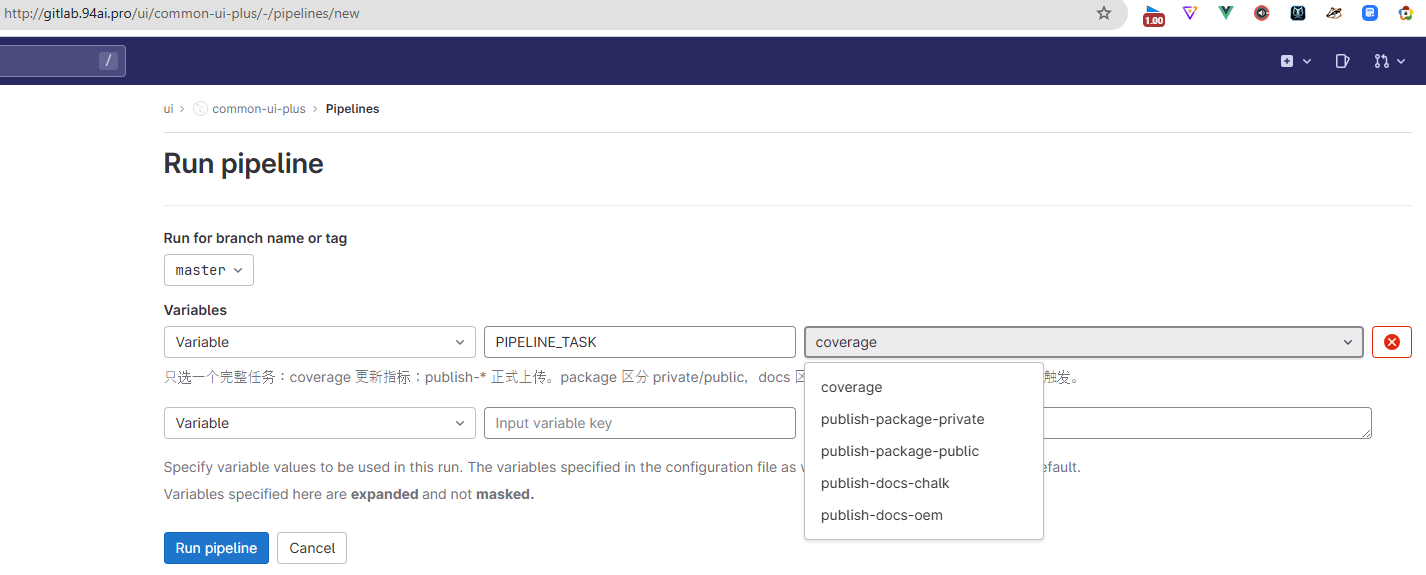
See the GitLab CI/CD guide (Chinese) for variables, Runner setup, steps and retries.
Preparing a Release Version for CI
yarn ci-lock-version
├─ Interactive choices: current / prerelease / patch / minor / major / custom
│  └─ Enter a full version, or run yarn ci-lock-version 1.0.0-beta.2
├─ Synchronize versions
│  ├─ Root, Lerna, source packages and explicit internal dependency versions
│  ├─ Versioned package README links
│  └─ yarn.lock (preserve workspace:^)
├─ No builds, uploads or changelog edits; --dry-run previews only
└─ Review changes → prepare version notes → commit and push → run CI

Normal local publication offers version selection without ci-lock-version.
Loading Environment Variables
Environment variable sources
├─ Terminal / CI injection (takes precedence for matching names)
└─ Root .env.local
   ├─ Automatically loaded by the Yarn bootstrap, including yarn install
   ├─ Publication scripts also explicitly load it through Node
   ├─ A missing file does not block CI
   └─ .env.local and .env.*.local are Git-ignored; never commit credentials
Configure npm, OSS and GitLab variables as needed using .env.example.
Private-registry authentication uses NPM_PRIVATE_USERNAME and NPM_PRIVATE_PASSWORD_BASE64 (Base64 of the password only). Yarn derives npmAuthIdent in memory, while npm / Lerna use registry-scoped username/password configuration. Complete private credentials take precedence for the private registry and do not require NPM_AUTH_TOKEN. Public npm publishing still requires a token. Direct npm invocations do not automatically read .env.local, but this repository's publication scripts explicitly load it.
yarn public --dry-run             # Public npm build, test and packaging preflight
yarn private --dry-run            # Company private-registry preflight
yarn release:gitlab --dry-run      # Preview GitLab Release notes
yarn release:gitee --dry-run       # Preview Gitee Release notes offline
Actual yarn public / yarn private commands (or npm run public / npm run private) first offer the current version, next prerelease, patch/minor/major or a custom complete version, then ask you to confirm the registry and package list. The fixed version is synchronized across root package.json, lerna.json, publishable packages and internal dependency ranges. Uploading requires another confirmation after builds, tests and packaging pass. All versions, including alpha/beta prereleases, default to the latest tag instead of automatically using next. Cancellation or failure does not automatically commit or push; applied version changes remain local.
Normal package preflight runs dependency audit → lint:check → source type checking → full tests and coverage → theme/component builds → build integration tests → fixed-version CLI snapshot → package validation. Lint or type errors stop before tests or builds. Public npm, private registries, GitHub Packages and their CI/dry-run entries share this order.
Package Publication Steps
public (Public npm) and private (Private Registry)
Use yarn public or yarn private. Before numbered steps, the entry loads the environment, validates package identities/fixed versions and selects/confirms the version. Real publication also checks registry authentication and the remote repository. Public npm additionally preflights GitLab Release, matching changelog notes, a clean pushed commit and ZIP-upload configuration; private publication does not perform these Release/archive checks.
These numbers match full-publication console output: 1/13 through 13/13 for public npm, and 1/11 through 11/11 for private registries.
| Step | Operation | public | private |
|---|---|---|---|
| 1 | Dependency audit: yarn audit:dependencies | Run | Run |
| 2 | Code quality: yarn lint:check, without automatic fixes | Run | Run |
| 3 | Type checking: yarn typecheck | Run | Run |
| 4 | Complete checks tests and coverage: yarn test:coverage; lines/statements/functions/branches each ≥99% | Run | Run |
| 5 | Build themes: yarn build:theme | Run | Run |
| 6 | Build components and CLI: yarn build:components | Run | Run |
| 7 | Build integration tests: yarn test --project build; setup still prepares required theme/component artifacts | Run | Run |
| 8 | Fixed-version CLI snapshot: yarn build:components cli --ai-snapshot-version <fixed-version>, followed by validation | Run | Run |
| 9 | Pack validation: per-package npm pack --dry-run --json, checking version, required files, README assets and snapshot | Real publication also creates the local lib ZIP here | No ZIP |
| 10 | Upload confirmation: review registry, version, dist-tag and package list | Run | Run |
| 11 | npm publication, default dist-tag latest | Lerna publish from-package | Aliyun checks locally hosted versions before individual uploads; other private registries use Lerna |
| 12 | Upload lib ZIP to the restricted OSS releases/ prefix and verify SHA-256 by readback | Run | No step |
| 13 | Create/verify GitLab Release from matching version notes, including the ZIP download link | Run | No step |
Any failure stops later steps. Ordinary --dry-run still runs the first nine steps but creates no ZIP, skips upload confirmation and all remote writes, and performs no online authentication/remote preflight. These numbers do not apply to public:reuse/private:reuse; see the reuse flow below.
Reusing Verified Artifacts and Retrying Publication
When existing artifacts match the current source and have passed verification, reuse them to publish or retry the same version:
npm run public:reuse                  # Equivalent to npm run public -- --reuse-build
npm run public:reuse -- --dry-run     # Preflight only; no upload
npm run private:reuse                 # Equivalent to npm run private -- --reuse-build
npm run private:reuse -- --dry-run    # Private reuse preflight; no upload
These numbers match reuse-publication console output: 1/7 through 7/7 for public npm, and 1/5 through 5/5 for private registries. Before numbered steps, the entry still validates the package list and current fixed version and confirms the target. Real publication checks registry authentication and the remote repository upfront; public npm additionally checks GitLab Release, matching changelog notes, a clean pushed commit and ZIP-upload configuration.
| Step | Operation | public:reuse | private:reuse |
|---|---|---|---|
| 1 | Fixed-version CLI snapshot: reuse and validate the existing snapshot for the current fixed version, without regenerating it | Run | Run |
| 2 | Pack validation: sync existing repository README display images, then run per-package npm pack --dry-run --json to check version, required files and README assets | Real publication also creates the local lib ZIP here | No ZIP |
| 3 | Preflight results: summarize authentication, version and remote repository checks completed upfront | Also summarize GitLab Release preflight | No GitLab Release checks |
| 4 | Upload confirmation: review registry, version, dist-tag and package list | Run | Run |
| 5 | npm publication, default dist-tag latest | Lerna publish from-package | Aliyun checks locally hosted versions before individual uploads; other private registries use Lerna |
| 6 | Upload lib ZIP to the restricted OSS releases/ prefix and verify SHA-256 by readback | Run | No step |
| 7 | Create/verify GitLab Release from matching version notes, including the ZIP download link | Run | No step |
Any failure stops later steps. Reuse --dry-run still validates the snapshot and package contents. Step 3 only summarizes local version checks and, for public npm, the local Release plan; it performs no online authentication or remote checks. Later steps skip upload confirmation and all external writes, and no ZIP is generated.
public:reuse/private:reuse uses packages/*/dist; lib/ is an archival mirror. It skips dependency auditing, lint checks, type checking, full tests and coverage, theme/component/CLI builds and build integration tests. It retains fixed-version and CLI snapshot integrity checks, and npm pack content and README validation. It trusts prior artifact verification without treating an older coverage report as a new passing run or generating a new report. Real publication still requires registry authentication and final upload confirmation. Only public npm performs GitLab Release preflight; private publishing does not. The version menu accepts only the current fixed version; selecting another fails before file changes or uploads. Normal publication and CI retain the complete checks.
├─ CLI knowledge snapshots
│  ├─ A normal CLI build, yarn build:components cli, generates development local knowledge.
│  ├─ Normal publication rebuilds the CLI after tests with a snapshot for the current lerna.json version.
│  ├─ Reuse publication does not regenerate it, so the existing CLI must contain matching versioned knowledge.
│  └─ To prepare it separately, run yarn build:components cli --ai-snapshot-version 1.0.0-alpha.6, replacing the example version with the current fixed version, then complete the relevant verification.
├─ Public npm validation and publication retries
│  ├─ Public npm publication checks every package, including the CLI, for publishConfig.access: public to avoid E402 caused by restricted access on a scoped package's first publication.
│  ├─ After success or failure, the publisher restores verified temporary Lerna gitHead and workspace dependency conversions;
│  ├─ other file changes are preserved and reported as conflicts.
│  ├─ A partial upload failure does not roll back published versions or proceed to GitLab Release creation.
│  ├─ Resolve the cause and retry the same version;
│  └─ from-package skips versions already published.
├─ Aliyun private-registry validation
│  ├─ Aliyun registry queries can include versions proxied from the public registry. private/private:reuse packs in a temporary directory, resolves workspace dependencies there, and still uploads versions marked _source_registry_name: default.
│  ├─ Only locally hosted versions with matching SHA-512 are skipped;
│  ├─ different content is rejected.
│  ├─ After upload, the publisher verifies local ownership, integrity and the dist-tag.
│  ├─ Failures stop publication without changing source manifests or automatically retrying uploads.
│  └─ CI private tasks use the same behavior.
├─ Non-interactive CI and version arguments
│  ├─ Non-interactive CI must specify a version and confirmation explicitly, for example yarn public --release-version 1.0.0-alpha.1 --yes. --dry-run skips version prompts and does not modify versions.
│  └─ You may supply --release-version to preview a target, but build/pack checks still validate the current version.
├─ Dry-run boundaries
│  ├─ Package publication with --dry-run runs builds, tests and pack validation and may update local generated files, but never uploads packages or creates a Release.
│  ├─ It does not prove registry identity or scope write permissions. publish:doc --dry-run only validates existing documentation artifacts;
│  ├─ release:gitlab --dry-run only previews matching version notes.
│  └─ Both are offline.
├─ lib ZIP archives and uploads
│  ├─ After all npm packages succeed, public and public:reuse upload a lib ZIP and create or verify its GitLab Release download link.
│  ├─ The ZIP uses the lib mirror layout, taking files from validated workspaces rather than stale local mirrors.
│  ├─ It includes READMEs, licenses, display images, CLI Skill and snapshot.
│  ├─ Archives are saved under releases/, named by version and SHA-256, uploaded only to OSS releases/, and verified by full hash readback.
│  ├─ Identical content is reused;
│  ├─ conflicting content is never overwritten.
│  └─ Compression and network waits report progress every 15 seconds.
├─ OSS configuration and attachment retries
│  ├─ Configure the four OSS variables plus RELEASE_ASSET_BASE_URL=https://front.94ai.com/releases (the complete public download directory matching the OSS objects);
│  ├─ OSS_ENDPOINT is optional.
│  ├─ Configuration is checked before npm upload.
│  ├─ Private and GitHub publication do not require archive settings.
│  ├─ If attachment or Release creation fails after npm succeeds, keep matching current-version artifacts and run yarn release:gitlab --release-version <current-version> --yes.
│  └─ This adds missing links to an otherwise identical Release without changing its body, tag or conflicting links. yarn release:gitlab --dry-run previews offline without generating a ZIP.
├─ Publication entries and remote repository
│  ├─ Use separate publication entries: public for public npm, private for the private registry, publish:doc:all for main-site documentation and publish:doc:all:oem for OEM documentation. release:gitlab retries the lib ZIP upload and GitLab Release download link without republishing npm packages.
│  ├─ The current GitLab remote is http://gitlab.94ai.pro/ui/common-ui-plus.git;
│  └─ scripts reject publishing to the old common-ui remote.
├─ Development log generation
│  ├─ yarn build:dev-log generates the separate Development Log (docs/en/development-log.md) and search indexes from committed Git history.
│  ├─ The English page is available at /common-ui-plus/en/development-log, with an overview, monthly statistics and commit details.
│  ├─ Run this command separately when an update is needed;
│  ├─ documentation development startup and production builds do not regenerate development logs, commit statistics or version CHANGELOG entries.
│  └─ Uncommitted changes are not counted.
└─ Commit statistics and version notes
   ├─ Commit statistics are written to utils/statistics/output/.
   └─ User-facing version history remains in docs/en/changelog.md (docs/en/changelog.md) and is not overwritten by the development log generator.
Related documentation: GitLab Release guide (Chinese) · Development Log · docs/en/changelog.md
GitHub Packages
In addition to npm and the company registry, yarn publish:github --dry-run validates a separate channel at https://npm.pkg.github.com/. The Publish GitHub Packages Actions workflow is manual-only, requires the exact current fixed version, and defaults to dry-run. It uses the automatic GITHUB_TOKEN without changing existing publication entry points, package names or versions, and never commits or pushes Git changes.
Temporary tarballs link to 94ai-plus/common-ui-plus; source manifests retain their GitLab repository. After the first release, check each GitHub package is Public. GitHub's npm registry requires authentication even when installing public packages. See the GitHub Packages setup guide (Chinese) for setup, installation and safe retries.
After successful real package publication, a separate Actions job with contents: write calls release:github:action, using the automatic GITHUB_TOKEN to create a Release in 94ai-plus/common-ui-plus from the matching docs/changelog.md section and a v<version> tag bound to the workflow commit. Alpha/beta versions are marked as prereleases. This entry is Actions-only and never uses GITHUB_PACKAGES_TOKEN.
For manual local Releases, use GITHUB_PACKAGES_TOKEN: yarn release:github:organization targets 94ai-plus/common-ui-plus, while yarn release:github targets xccjh/common-ui-plus. Both publish the current lerna.json fixed version immediately without a version argument or --yes; add --dry-run for an offline preview. They still require content-write permission on the target repository, a clean checkout and the current commit already pushed. write:packages alone cannot create Releases. Identical Releases are skipped; conflicting contents or tags are not overwritten. These local entries publish notes only, without package publication or builds.
publish:github
Preview with yarn publish:github --dry-run; upload with yarn publish:github --release-version <fixed-version> --yes. The following numbers explain the outer execution order. Shared preflight prints the nested public --dry-run numbering and skipped-step messages; this does not publish to public npm.
| Step | Operation |
|---|---|
| 1 | Validate root/Lerna/package fixed versions, package identities, workspace dependencies and arguments. Real publication also validates dedicated GitHub authentication, a clean checkout, repository identity and workflow commit. |
| 2 | Dependency audit: yarn audit:dependencies. |
| 3 | Code quality: yarn lint:check. |
| 4 | Type checking: yarn typecheck. |
| 5 | Complete tests and coverage: yarn test:coverage, each metric ≥99%. |
| 6 | Build themes: yarn build:theme. |
| 7 | Build components and CLI: yarn build:components. |
| 8 | Build integration tests: yarn test --project build. |
| 9 | Fixed-version CLI snapshot: yarn build:components cli --ai-snapshot-version <fixed-version>. |
| 10 | Shared pack validation: steps 2–10 run through public --dry-run, without npm upload, lib ZIP creation/upload or GitLab Release creation. |
| 11 | Before real upload, recheck the checkout and stop if preflight changed tracked source files. |
| 12 | Resolve workspace dependencies and associate GitHub repository/registry in temporary staging, then repack and validate tarball file lists/integrity. Source manifests retain their existing channel metadata. |
| 13 | For real publication, inspect every package's online version, integrity, repository association and dist-tag before any upload; reject conflicts or a downgrade of latest. |
| 14 | Upload missing packages or reuse identical versions and update latest when needed. Outer --dry-run ends after local tarball checks, without GitHub API/registry access. |
| 15 | Clean up temporary packaging directories and authentication configuration on success or failure. |
The GitHub Actions workflow previews matching changelog notes using release:github:action --dry-run before package publication. After every package succeeds, a separate job runs release:github:action to create the organization repository Release/tag. Local publish:github does not automatically create a GitHub Release. All three full-publication channels use dedicated checks rather than test:all; run separate type-consumer and Playwright checks as needed.
Release Engineering
Gitee Release
yarn release:gitee reads the current fixed version from lerna.json, extracts the matching notes from docs/changelog.md and publishes immediately; add --dry-run for an offline preview. Configure a dedicated GITEE_TOKEN with projects scope, commit and push the source, version and notes to the Gitee repository, and keep a clean checkout. Run yarn release:gitee to create the Release and a missing v<version> tag. Identical Releases are skipped; conflicting contents or tags pointing to another commit are not overwritten. This independent entry publishes notes without npm publication or ZIP uploads; existing publication flows remain unchanged. See the Gitee Release guide (Chinese) for configuration and retries.
yarn release:gitee --dry-run
yarn release:gitee
GitHub Release
These entries extract matching version notes from docs/changelog.md, targeting the organization and personal GitHub repositories:
| Command | Target repository | Purpose and authentication |
|---|---|---|
yarn release:github:organization | 94ai-plus/common-ui-plus | Manually create an organization Release and a missing tag locally using GITHUB_PACKAGES_TOKEN; no builds, npm publication or ZIP uploads. |
yarn release:github | xccjh/common-ui-plus | Manually create a personal Release and a missing tag locally using GITHUB_PACKAGES_TOKEN; no builds, npm publication or ZIP uploads. |
Both entries publish the current lerna.json fixed version immediately without arguments or --yes. Optional --release-version must match the current version; --yes remains accepted. The version must match the root package, lerna.json and changelog. Commit and push the reviewed source, version and notes to the selected repository, keeping a clean checkout. Identical Releases can be skipped; conflicting notes or tags pointing to another commit are rejected.
# Offline previews: no network, ZIP generation, tag creation or Release writes
yarn release:github:organization --dry-run
yarn release:github --dry-run

# Real publication: use the current committed fixed version
yarn release:github:organization
yarn release:github
The two local GitHub entries only use GITHUB_PACKAGES_TOKEN, without falling back to GITHUB_TOKEN. Automated Actions Releases use the separate release:github:action entry. See the GitHub Release guide (Chinese) for configuration and retries.
GitLab Release
yarn release:gitlab extracts matching version notes from docs/changelog.md and publishes to ui/common-ui-plus. After confirming npm publication, it validates current artifacts, generates and uploads the lib ZIP, then creates a Release or adds missing attachment links to an identical Release. It requires a dedicated GITLAB_TOKEN, OSS configuration and RELEASE_ASSET_BASE_URL; no rebuilding or npm publication.
Without arguments, this entry publishes the current lerna.json fixed version immediately, without --yes. Optional --release-version must match the current version. The version must match the root package, lerna.json and changelog. Commit and push the reviewed source, version and notes to the target repository, keeping a clean checkout. Conflicting notes or tags pointing to another commit are rejected. This retry entry does not independently verify npm publication: confirm it manually first. Artifact validation, compression and attachment upload still run for an identical existing Release. See the GitLab Release guide (Chinese) for configuration and retries.
# Offline preview: no network, ZIP generation, tag creation or Release writes
yarn release:gitlab --dry-run

# Real publication: use the current committed fixed version
yarn release:gitlab
Contributors
Thank you to everyone who contributes to this project!
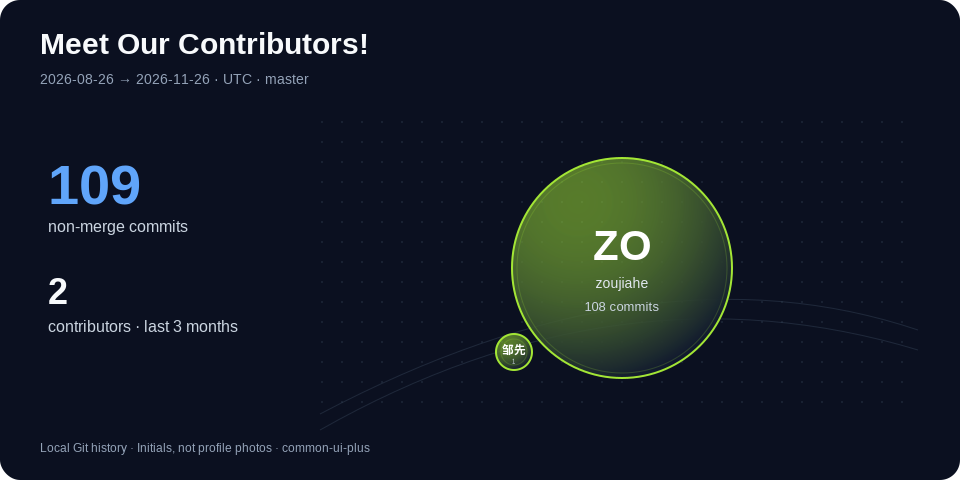

These images show non-merge Git commits from the last three calendar months. The statistics date and branch are noted in the images. Bubble size represents commit count; avatars use name initials, not GitLab profile photos. Identity grouping follows .mailmap. Email addresses are not published, and issues, comments and merge-request counts are excluded. Images are stored in the repository. Run the command and commit the resulting images to update them; opening the README does not refresh them automatically. The command reads complete local Git history only: it does not fetch, call the GitLab API or require an Access Token. Shallow clones need their history completed first; CI can use GIT_DEPTH: 0.
yarn build:contributors                            # Update both SVGs for the current branch and UTC date
yarn build:contributors --ref=test --until=2026-10-31 # Choose a branch and cutoff date
License
This project is licensed under the MIT License.
Copyright (c) 2026-present Jiahe Zou, 94 Intelligent Technology Co., Ltd.